
Unlock the secrets to Google success! Explore the 20 key ranking factors that will elevate your SEO game and propel your website to the top of search results.
Dive into our comprehensive guide to tap into Google's goldmine and boost your online visibility today.
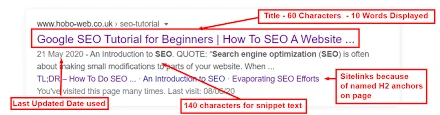
For example, let’s say you’re writing a blog post about “healthy breakfast ideas.” Your title tag could be: “10 Delicious and Nutritious Healthy Breakfast Ideas | YourWebsite.com”.
In this title:
“10 Delicious and Nutritious Healthy Breakfast Ideas” is compelling and tells users exactly what they’ll find on the page. ” |YourWebsite.com” is optional but can be useful for branding purposes. By ensuring your title is compelling, relevant, and includes your target keyword, you increase the likelihood of attracting clicks from users and ranking well in search engine results.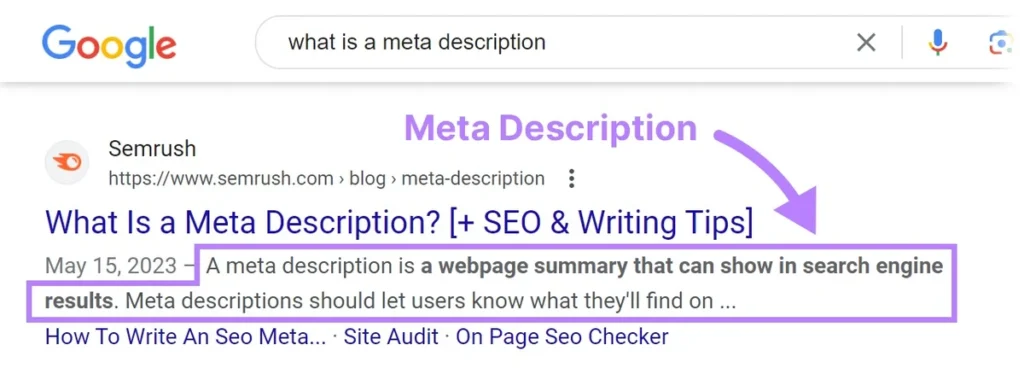
The meta description is the brief snippet of text that appears below the title tag in search engine results pages (SERPs). While it doesn’t directly impact rankings, it plays a crucial role in attracting clicks from searchers. Here’s how to optimize it effectively:
Keep your meta description short and to the point, typically between 150-160 characters. This ensures that it’s fully displayed in search results and doesn’t get cut off. Aim to convey the essence of your content succinctly.
Your meta description should compel users to click through to your website. Use language that sparks curiosity, offers a benefit, or addresses a user’s need or pain point. Consider incorporating a call-to-action (CTA) to encourage action, such as “Learn more,” “Discover now,” or “Get started.”
The meta description should provide an accurate summary of what users can expect to find on your webpage. It should align with the content of the page and fulfill the promise made in the title tag. Misleading or deceptive meta descriptions can lead to a high bounce rate and a negative user experience.
For example, let’s say your webpage offers tips for improving productivity. A concise and engaging meta description could be: “Boost your productivity with these 10 proven strategies. From time management tips to effective goal-setting techniques, unleash your full potential today!”
In this meta description:
By writing a concise and engaging meta description that accurately summarizes your content and encourages clicks, you increase the likelihood of attracting qualified traffic to your website from search engine results.

The URL structure refers to the format and organization of the web address that directs users to a specific webpage on your site. Here’s how to optimize your URL structure effectively:
Keep your URLs concise and easy to read. Short URLs are not only more user-friendly but also easier for search engines to crawl and understand. Aim to include only the most relevant keywords and avoid unnecessary words or characters.
Your URL should accurately describe the content of the webpage it points to. Use clear and descriptive words that give users and search engines a good idea of what the page is about. Avoid generic or cryptic URLs that don’t provide meaningful information.
Whenever it makes sense and fits naturally, include your target keyword in the URL. This helps reinforce the relevance of the page to search engines and can improve its chances of ranking for that keyword. However, don’t force keywords into the URL if they don’t naturally fit or if it compromises readability.
For example, let’s say you have a webpage about “healthy smoothie recipes.” A well-optimized URL structure for this page could be:
https://www.yourwebsite.com/healthy-smoothie-recipes
In this URL:
By keeping your URLs short, descriptive, and including your target keyword if possible, you create a more user-friendly experience, improve search engine visibility, and enhance the overall SEO of your website.
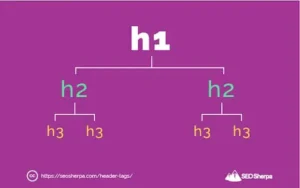
Headings (H1, H2, etc.) play a crucial role in structuring your content both for readers and search engines. Here’s a deeper dive into how to optimize headings effectively:
Headings provide a hierarchical structure to your content, making it easier for readers to navigate and understand. The H1 tag should typically be used for the main title of your page or article, representing the overarching topic or theme. Subsequent headings (H2, H3, etc.) are used to break down the content into smaller sections and subsections. This logical structure helps users quickly scan and comprehend the content.
While it’s important to incorporate your target keywords into headings where appropriate, it’s equally essential to prioritize readability and natural language. Don’t force keywords into headings if they don’t fit contextually or compromise the flow of your content. Instead, focus on using headings to accurately represent the content of each section and provide context to both readers and search engines.
For example, let’s say you’re creating a blog post about “digital marketing strategies.” Your heading structure could look something like this:
In this example:
By using headings to structure your content logically and including your target keywords where relevant, you improve the readability, user experience, and SEO of your webpage or article.

Image optimization is essential for improving the accessibility, user experience, and performance of your website. Here’s a closer look at the key components of image optimization:
When saving images for your website, use descriptive filenames that accurately describe the content of the image. Avoid generic filenames like “image1.jpg” or “photo123.png” and instead use descriptive terms related to the subject matter of the image. For example, if you have an image of a beach sunset, a descriptive filename could be “beach-sunset.jpg”. This not only helps search engines understand the content of the image but also improves the likelihood of your images appearing in image search results.
Alt tags, or alternative text, provide a textual description of an image for users who are unable to view it, such as those using screen readers or those with slow internet connections. Alt tags also serve as a fallback in case the image fails to load. When adding alt tags to your images, be descriptive and include relevant keywords where appropriate. Aim to provide a concise and accurate description of the image’s content or function.
For example, for an image of a red bicycle, a suitable alt tag could be “Red bicycle parked on a city street”.
Optimizing your images for web use involves balancing image quality with file size to ensure fast loading times without sacrificing visual clarity. Use image editing software or online compression tools to reduce the file size of your images while maintaining acceptable quality. Formats like JPEG and PNG are commonly used for web images, with JPEG being more suitable for photographs and PNG being better for graphics with transparency. Aim to strike a balance between image quality and file size to optimize load times and improve user experience.
Consider using the WebP image format for your website’s images. WebP offers superior compression compared to traditional formats like JPEG and PNG, resulting in smaller file sizes without significant loss of image quality. By serving images in the WebP format, you can further optimize load times and improve user experience, especially for visitors with slower internet connections or limited bandwidth.
When implementing WebP images on your website:
By incorporating WebP images into your image optimization strategy, you can maximize the performance and efficiency of your website’s images, ultimately improving user experience and potentially boosting your website’s search engine rankings.
“geolmgr.com” is a website related to geo-location management. However, without direct access to the website or more context, I can only speculate about its functions.
Typically, a website with “geo” in its name might offer services related to geographic information systems (GIS), location-based services, or tools for managing geographical data. It could potentially provide features such as mapping, geocoding, reverse geocoding, spatial analysis, and more.
TheExifer.net is a website that offers a variety of tools and services related to digital image metadata. Specifically, it focuses on EXIF data, which stands for Exchangeable Image File Format. EXIF data is metadata embedded within image files that contain information such as camera settings, date and time the photo was taken, GPS coordinates (if available), and other technical details about the image.
TheExifer.net provides tools to view, edit, and analyze EXIF data from image files. Users can upload their images to the website and access detailed information about the metadata contained within those images. Additionally, it may offer features such as removing or modifying EXIF data, extracting GPS coordinates, and analyzing trends or patterns within the metadata.
Overall, TheExifer.net serves as a valuable resource for photographers, researchers, and anyone interested in understanding and managing the metadata associated with digital images.
Ezgif.com is a popular online platform that offers a variety of tools and services for editing and creating GIFs (Graphics Interchange Format). Some of its key functions include:
GIF Maker: Users can create GIFs from images, videos, YouTube links, or webcam recordings. They can adjust parameters such as frame delay, size, and quality to customize the GIF according to their preferences.
GIF Editor: Ezgif.com provides tools for editing existing GIFs. Users can crop, resize, rotate, and optimize GIFs. They can also add text, overlays, effects, and stickers to enhance their creations.
GIF Splitter: This tool allows users to split a GIF into individual frames or extract specific frames from the GIF.
GIF Compressor: Users can reduce the file size of GIFs without significantly compromising their quality by using the compressor tool.
GIF Resizer: Ezgif.com enables users to resize GIFs by specifying custom dimensions or choosing from pre-defined sizes.
Other Tools: The website offers additional utilities such as a GIF reverser, GIF to video converter, video to GIF converter, and more.
Overall, Ezgif.com provides a comprehensive set of tools for both creating and editing GIFs, making it a popular choice among individuals looking to work with this popular image format.
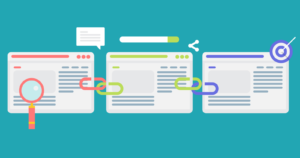
Internal linking is the practice of adding hyperlinks within your website’s content that point to other pages within the same website. Here’s a deeper dive into internal linking and its benefits:
Internal links serve as signposts that guide visitors to other relevant pages on your website. By strategically placing internal links within your content, you make it easier for users to navigate your site and discover related information. This improves the overall user experience and encourages visitors to explore more pages on your website, reducing bounce rates and increasing engagement.
Link equity, also known as link juice, refers to the authority or value passed from one page to another through hyperlinks. When you link from one page to another within your website, you’re essentially sharing some of the authority and relevance of the linking page with the linked-to page.
By strategically interlinking your website’s pages, you can distribute link equity more evenly across your site, helping to boost the visibility and rankings of important pages in search engine results.
Best practices for internal linking include:
Relevance: Ensure that the anchor text (the clickable text of the hyperlink) and the content surrounding the link are relevant to the linked-to page. This helps search engines understand the context of the link and improves user experience.
Hierarchy: Consider the hierarchy and structure of your website when implementing internal links. Link from high-authority pages to lower-level pages to pass link equity effectively and prioritize pages based on their importance and relevance.
Anchor text: Use descriptive and keyword-rich anchor text that accurately reflects the content of the linked-to page. Avoid generic anchor text like “click here” and instead use specific, meaningful phrases that provide context to both users and search engines.
Consistency: Regularly review and update your internal linking strategy as your website evolves. Ensure that internal links remain relevant and functional, especially when making changes to your site’s structure or content.
By incorporating internal links into your website’s content and following best practices, you can improve navigation, enhance user experience, and spread link equity effectively throughout your site, ultimately contributing to better search engine rankings and increased organic traffic.
The meta description is the brief snippet of text that appears below the title tag in search engine results pages (SERPs). While it doesn’t directly impact rankings, it plays a crucial role in attracting clicks from searchers. Here’s how to optimize it effectively:
.
Title Tag
Meta Description:
URL Structure:
Headings (H1, H2, etc.):
Keyword Density:
Content Length:
Keyword Placement:
LSI Keywords:
Internal Links:
External Links:
Mobile Optimization:
Page Speed:
Image Optimization:
Structured Data Markup:
Social Sharing:
User Engagement Metrics:
Freshness:
Geotargeting:
Voice Search Optimization:
User Experience (UX):
Home
.
yagnapala.com
+91-99 4891 6667
582, 9th Main Road, Cofee Board layoutt, Kempapura, Babgaluru-24.